
Download Universal Virus Sniffer – Free, Lightweight Antivirus for Windows & Mac
Looking for a secure, fast, and free antivirus tool that doesn’t slow down your PC? Universal Virus Sniffer is a lightweight, open-source antivirus software designed for Windows and Mac users who want a straightforward yet powerful way to detect and remove malware, viruses, and other digital threats. Developed by Dmitriy Kuznetzoff, this portable antivirus app stands out from mainstream options like Avast Free Antivirus or 360 Total Security thanks to its multiple scanning modes, script support, and minimal system footprint. Whether you're scanning a single file, a full system, or even an offline OS image, Universal Virus Sniffer delivers accurate results with minimal user input. Its intuitive interface makes it easy to navigate, even for beginners, while advanced users can dive into automated scripts and custom signature imports. With support for scheduled scans and real-time threat detection in active modes, it’s ideal for both casual users and IT professionals. Best of all, it’s completely free to download and use—no hidden fees or trial limitations. Keep your devices safe with a tool that’s as efficient as it is reliable.
Key Features of Universal Virus Sniffer
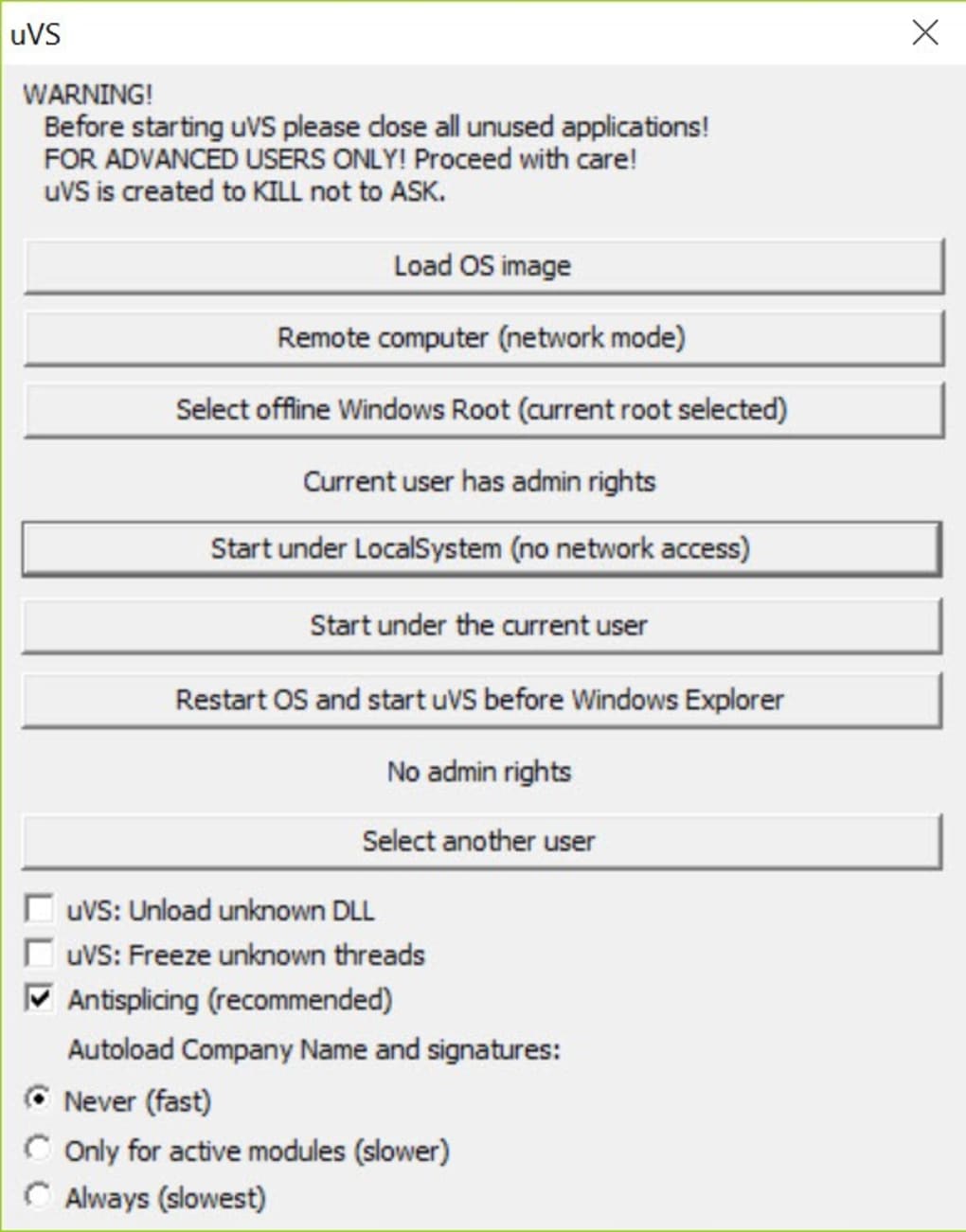
Universal Virus Sniffer isn’t just another antivirus app—it’s a versatile security tool packed with intelligent features that cater to both novice and advanced users. One of its standout capabilities is the multi-mode scanning system, offering four distinct operating modes: Active Mode (real-time scanning with network access), Active Without Network Access (ideal for isolated or compromised systems), Remote System Mode (for scanning connected devices), and OS Image Check (perfect for forensic analysis or pre-installation checks). This flexibility ensures you can adapt the software to almost any threat scenario, from routine checks to emergency malware removal.
Another major advantage is its scripting engine, which allows users to automate tasks such as periodic scans, signature updates, and data exports. This is particularly useful for system administrators managing multiple endpoints. The app also supports custom virus signature imports, enabling you to integrate your own threat definitions or those from third-party databases. This feature enhances detection accuracy, especially against emerging or zero-day threats. Additionally, the built-in virus database browser lets you explore known malware entries, view detection details, and even contribute to community-driven threat intelligence by uploading suspicious files.
For users who prioritize portability, Universal Virus Sniffer is a perfect choice. It runs directly from a USB drive without installation, making it ideal for emergency cleanups on infected machines or checking devices in public environments. Its lightweight design ensures minimal CPU and memory usage, so your system stays responsive during scans. With no background processes, no telemetry, and no ads, it’s one of the cleanest antivirus tools available. Whether you’re scanning a single file or a full hard drive, the software delivers fast, reliable results with clear, actionable feedback.
How to Install and Use Universal Virus Sniffer
Installing Universal Virus Sniffer is incredibly simple—because it’s a portable application, you don’t need to go through a traditional setup process. Just download the latest version from the official website, extract the ZIP file to your desired location (like a USB drive or desktop), and launch the executable file. No installation means no registry changes, no leftover files, and no system modifications—perfect for temporary use or secure environments.
Once launched, you’ll be greeted by a clean, no-frills interface that displays all available scanning modes. To begin, select your preferred mode: Active, Active Without Network, Remote System, or OS Image. For example, if you suspect a USB drive is infected, use the Remote System mode to scan it safely without connecting to the internet. If you're dealing with a severely compromised system, choose Active Without Network Access to prevent malware from communicating during the scan.
After selecting a mode, choose the target—be it a specific file, folder, or entire drive. Click “Start Scan,” and the software will analyze each file using its built-in signature database and heuristic engine. If threats are detected, you’ll see a detailed report with options to delete, quarantine, reset attributes, or upload the file to a shared database for community review. Advanced users can also configure scripts via the “Tools” menu to automate recurring scans or update virus definitions from external sources.
For best results, schedule regular scans using the script feature. For instance, create a script that runs a full system scan every Sunday at 2 AM and logs results to a text file. This level of customization is rare in free antivirus tools and makes Universal Virus Sniffer a favorite among power users and IT professionals.
Compatibility & System Requirements
Universal Virus Sniffer is designed to run on a wide range of platforms, making it accessible to most users. It supports Windows 7 and later (including Windows 10 and Windows 11), as well as macOS 10.12 and above. The software is optimized for both 32-bit and 64-bit systems, ensuring compatibility with older and newer hardware. Whether you're using a desktop, laptop, or even a virtual machine, Universal Virus Sniffer performs reliably across different environments.
One of the biggest advantages of this tool is its portability. You can run it from a USB flash drive, external hard drive, or even a cloud storage folder (when enabled). This makes it an excellent choice for IT technicians, system administrators, or anyone who needs to scan multiple machines without installing software. It doesn’t require admin rights to run, which is ideal for use in restricted environments like schools, libraries, or corporate networks.
The app has minimal system requirements: as little as 50 MB of free disk space and 512 MB of RAM. It consumes under 5% CPU during scans and uses less than 20 MB of memory—far less than many mainstream antivirus suites. This ensures your device remains responsive, even during intensive operations. No background services, no startup delays, no performance degradation. It’s truly a lightweight, efficient solution for users who value speed and privacy.
Pros and Cons of Universal Virus Sniffer
Pros
- Free and open-source – No cost, no ads, no telemetry.
- Lightweight and fast – Minimal system resource usage.
- Multiple scanning modes – Active, offline, remote, and OS image scanning.
- Script support – Automate scans, updates, and data exports.
- Portable – Run from USB without installation.
- Custom signature imports – Enhance detection with user-defined definitions.
- Community-driven database – Upload and share suspicious files.
Cons
- Learning curve – Advanced features may confuse beginners.
- No real-time protection – Only on-demand scanning (not continuous monitoring).
- Smaller community – Less user support compared to Avast or Bitdefender.
- No mobile version – Not available for Android or iOS.
- Manual updates – Signature updates require user action (though scripts can automate this).
Frequently Asked Questions (FAQ)
Is Universal Virus Sniffer safe to download and use?
Yes, Universal Virus Sniffer is safe to download and use. It’s open-source, meaning its code is publicly available for review. The developer, Dmitriy Kuznetzoff, has a transparent track record. Always download from the official website to avoid modified or malicious versions.
Can I use Universal Virus Sniffer on Mac and Windows?
Yes, the software supports both Windows (7 and later) and macOS (10.12 and above). It’s available as a portable executable, so no installation is required on either platform.
Does it provide real-time protection?
No, Universal Virus Sniffer does not offer real-time protection. It’s designed for on-demand scanning only. For continuous monitoring, you’ll need to pair it with another antivirus or use scheduled scripts.
Can I update virus signatures automatically?
Manual updates are required by default, but you can create scripts to automate signature imports from external sources or update definitions at scheduled intervals.
Is it available for Android or iOS?
Currently, Universal Virus Sniffer is only available for Windows and Mac. There is no official version for Android or iOS devices.
Final Verdict: Is Universal Virus Sniffer Worth It?
Universal Virus Sniffer is a powerful, lightweight, and secure antivirus tool that stands out in a crowded market. While it lacks real-time protection, its versatility, portability, and advanced scripting capabilities make it a top choice for users who need a reliable on-demand scanner. Whether you're a casual user checking a suspicious file or an IT professional cleaning up infected systems, this software delivers excellent value—especially since it’s completely free.
If you’re looking for a no-nonsense, privacy-focused antivirus that doesn’t slow down your PC, download Universal Virus Sniffer today and take control of your system’s security with confidence.







